Decision-Making in JavaScript

Project Manager with Web Development skills with a tech stack of HTML, CSS, and JavaScript.
Introduction to Decision Making
Programming decision-making entails regulating the flow of your code through conditional statements. Depending on how the user interacts with the web page and/or the browser window itself, scripts frequently need to behave differently. The following ideas are frequently used by programmers to choose the best way of action:
Evaluations: You can examine the values in your scripts to see if they correspond to the outcomes you were hoping for.
Decisions: You can choose the direction your script should take based on the outcomes of evaluations.
Loops: There are numerous situations in which you will wish to repeat the same set of actions.
In Programming, flowcharts (graphical representation) can be used to represent the decision-making and logical flow of a program.
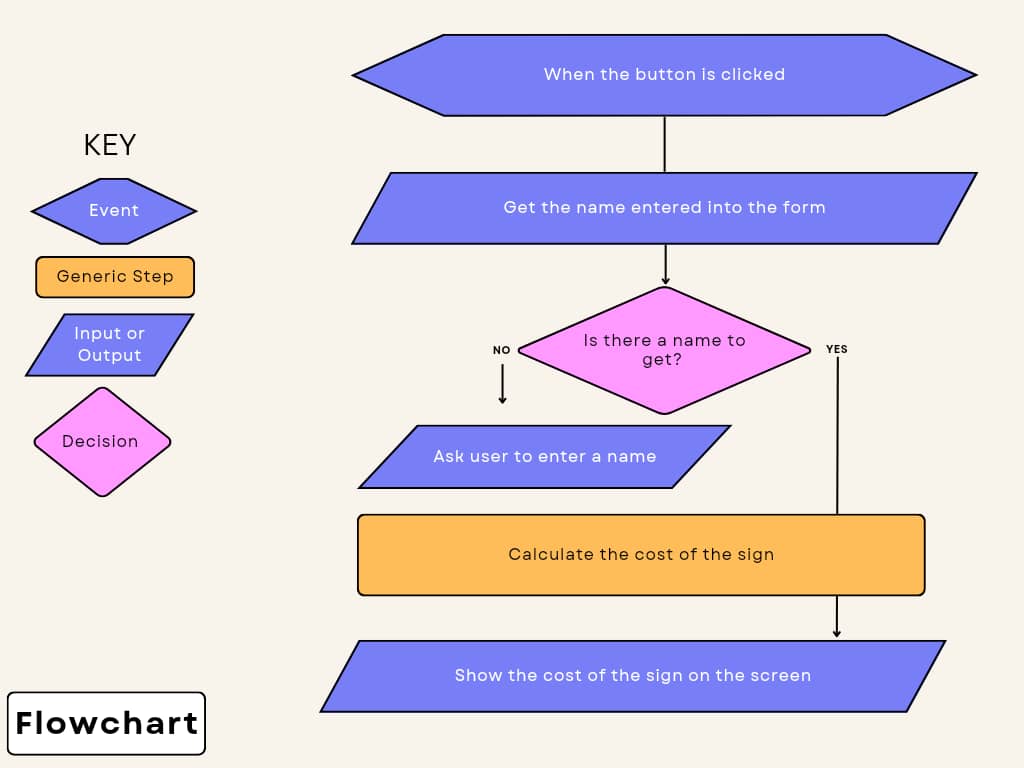
A decision must be made at some point in the flowchart diagram above. If there is a name to be collected, you go to the next stage. If there is no name to be collected, a statement in the code is generated to collect name input.
Role of Conditional Statements in JavaScript
Making choices in a game is similar to using conditional statements in coding. You instruct the computer to take one action if this occurs and a different one if that occurs. Based on the events occurring in the game or program, it helps the computer in making the best decision.
Sample code based on conditional statements:
if (condition) {
  // Code to execute if condition is true
} else if (anotherCondition) {
  // Code to execute if anotherCondition is true
} else {
  // Code to execute if none of the conditions are true
}
You can alternatively use the ternary operator for simpler conditions:
const result = condition ? 'Value if true' : 'Value if false';
Checking Equality and Existence
Using Comparison Operators
Comparison operators are used to compare values and evaluate conditions. Here are some common comparison operators and their usage:
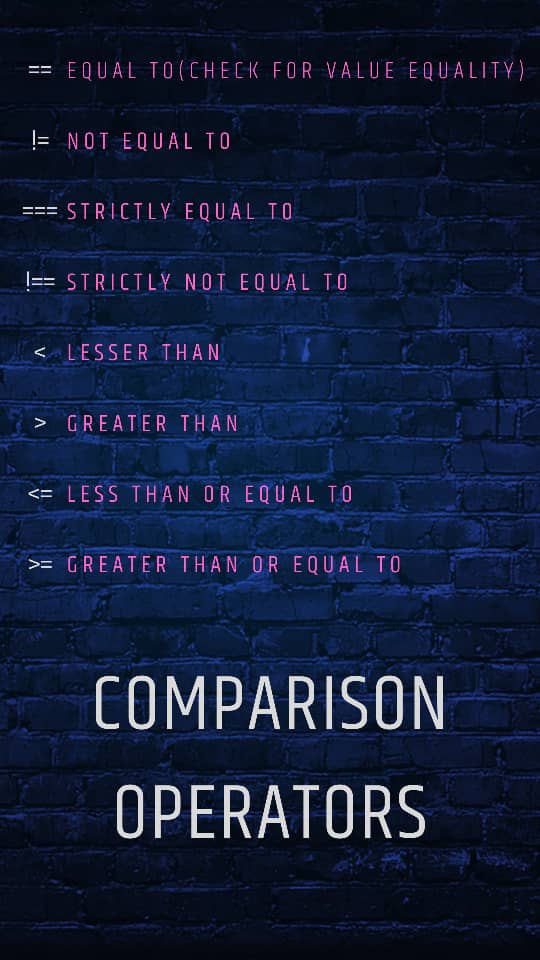
Here is an example of usage:
const x = 10;
const y = 5;

if (x > y)/*Evaluation of a condition*/{
  console.log("x is greater than y");/*Conditional statement*/
} else if (x < y)/*Evaluation of a condition*/ {
  console.log("x is less than y");/*Conditional statement*/
} else {
  console.log("x and y are equal");
}
In the code above, the comments "Evaluation of a condition" and "Conditional statement" are two components of a decision in programming. These are their methods of usage:
Evaluation of a condition: This is usually done by comparing two values with a comparison operator, which returns a true or false value.
Conditional statements: It is built on the if/then/else idea; if a condition is met, your code executes one or more statements; otherwise, your code does something different (or skips).
Type Coercion
In JavaScript, type coercion is the automatic conversion of values from one data type to another during an operation or comparison. Type coercion in coding is like a magical power that helps the computer understand different types of things and make them work together. It's like turning a toy car into a real car when you need it to drive, so you can use it even if they looks different. Here are examples of type coercion in JavaScript:
- String and Number Concatenation:
const num = 5;
const str = "10";
const result = num + str; // Type coercion occurs: num (number) is coerced into a string, and then string concatenation takes place.
console.log(result); // Outputs "510"
- Implicit Boolean Conversion:
const value = "Hello";
if (value) {
  console.log("Value is truthy"); // The string value is coerced into a boolean for the condition evaluation.
}
- Equality Comparison:
const num = 5;
const str = "5";
console.log(num == str); // Type coercion occurs: string "5" is coerced into a number before comparison. Outputs true.
console.log(num === str); // Strict equality comparison, no type coercion. Outputs false.
parseInt, parseFloat, Number, String, etc.Nullish Coalescing Operator (??)
The nullish coalescing operator (??) is used to provide a default value for a variable if its current value is null or undefined. The nullish coalescing operator functions like a magic hat, ensuring a special treasure is present only if something is inside, preventing trickery by an empty hat.
The nullish coalescing operator's basic syntax:
const someValue = possiblyNullValue ?? defaultValue;
If possiblyNullValue is null, undefined or has any falsy value, someValue will be assigned the value of defaultValue. Otherwise, it will take the value of possiblyNullValue.
Here is a sample code:
const userInput = null;
const defaultValue = "Hello, world!";
const greeting = userInput ?? defaultValue;

console.log(greeting); // Output: "Hello, world!"
In the example above, userInput is null, so the ?? operator assigns the defaultValue to greeting.
The nullish coalescing operator addresses a common need for providing default values when dealing with potentially null or undefined variables. It provides a more precise and reliable way to handle defaults compared to the OR operator (||), which can have unexpected behavior when dealing with other falsy values.
Optional Chaining (?.)
This is a feature in JavaScript used for working with nested objects and their properties. Optional chaining in JavaScript is like asking a friend a question, but if your friend doesn't know the answer, they won't say anything or give you an error; instead, they'll just stay quiet, so you don't get confused or upset. It helps you safely check for information in objects without worrying if something is missing.
If you have a nested object, and you want to access a property deep within it. Traditionally, you will do this:
const person = {
  name: "John",
  address: {
    street: "125 Oju-Elegba St",
    city: "Lagos",
  },
};

// Accessing the city property
const city = person.address && person.address.city;
You can achieve the same result concisely with optional chaining:
const person = {
  name: "John",
  address: {
    street: "125 Oju-Elegba St",
    city: "Lagos",
};

// Accessing the city property using optional chaining
const city = person.address?.city;
If any intermediate property (in this case, address) is null or undefined, the optional chaining operator returns undefined, preventing any "cannot read property of null" errors.
Truth and Falsy Values
Understanding truthy values
A "truthy" value is a value that is regarded as true when evaluated in the context of a Boolean. Truthy values in JavaScript are like things that are considered "yes" or "true" when we ask questions. For example, if we ask, "Is a cookie yummy?" and you have a cookie, you can say "yes" because you have something real (a cookie) to show. That's like a truthy value – it's something that exists and can be used in your computer programs.Here are some truthy values:
Non-Empty Strings: Any string with content.
Numbers (Except 0): Any number that is not zero.
Objects: All objects (including arrays and functions) are truthy.
Arrays: Empty arrays are considered truthy.
Functions: Any defined function is truthy.
Instances of custom classes: Objects created from custom classes, if they don't define a custom
valueOfortoStringmethod that returns a falsy value.
Using truthy values in a condition:
const firstCode = "Hello, world!";
if(firstCode) {
  console.log("This value is truthy.");
} else {
  console.log("This value is falsy.");
}
The code inside the if block will be executed since firstCode contains a non-empty string which is considered truthy.
Understanding falsy values
Falsy values in JavaScript act as invisible blocks, preventing code from performing its intended function. They can cause unexpected behavior or pauses in code. Falsy values are those that are explicitly considered false.
Some common falsy values in JavaScript:
The Boolean value 'false': This is the most straightforward falsy value, as it is explicitly 'false'.
The Number '0': The numeric value zero is considered falsy.
An empty string ' ': An empty string with no characters is falsy.
NaN (Not-a-Number): NaN is considered falsy.
null: The absence of any value or object is falsy.
undefined: Variables that have not been assigned a value are undefined and considered falsy.
Example of using falsy values in a condition:
const checkValue = 0;

if (checkValue) {
  console.log("This value is truthy.");
} else {
  console.log("This value is falsy.");
}
In this case, checkValue is assigned the value 0, which is a falsy value, so the code inside the else block will be executed.
Use Cases of Truthy and Falsy values
Depending on the circumstance and the logic you want to implement, truthy and falsy values in JavaScript have a variety of uses.
Use Cases for Truthy Values:
Default Values: You can use truthy values to set default values for variables or function parameters. If a variable is falsy (e.g., undefined or null), you can provide a default value.
Conditional Rendering: Truthy values are frequently used in web development to conditionally render elements or components depending on whether a specific condition is satisfied.
Looping: Truthy values can be used as conditions for loops, allowing you to iterate through arrays or objects until a specific condition is no longer met.
Use Cases for Falsy Values:
Default Values: Similar to truthy values, falsy values can be used to set default values when a variable is undefined, null, or another falsy value.
Checking for Missing Data: You can use falsy values to check for missing or incomplete data in objects. If a property is undefined or null, it can indicate missing data.
Error Handling: Falsy values can be useful when dealing with error conditions. For example, when a function returns an error object, you can check if it's falsy to determine if an error occurred.
Stopping Loops: You can use falsy values to exit loops when a specific condition is met.
Short-Circuit Evaluation
Programming languages like JavaScript have the idea of short-circuit evaluation, which causes the interpreter to stop evaluating an expression as soon as the result is known. It occurs in logical expressions involving logical AND (&&) and logical OR (||) operators. Logical operators are processed from left to right.
When the right operand requires complicated or time-consuming actions, short-circuit evaluation might be useful for performance and efficiency.
Logical AND (&&)
In an expression using &&, if the left operand is falsy, the entire expression is known to be falsy, so the right operand is not evaluated. If the left operand is truthy, the right operand is evaluated to determine the outcome.
Short-circuit with &&:
const result = false && someFunction(); // someFunction() is never called
Logical OR (||)
In an expression using ||, if the left operand is truthy, the entire expression is known to be truthy, so the right operand is not evaluated. If the left operand is falsy, the right operand is evaluated to determine the final outcome.
Short-circuit with | |:
const result = true || someFunction(); // someFunction() is never called
Conditional Statements
In JavaScript, conditional statements are used to determine whether or not to run particular chunks of code. Depending on whether a condition evaluates to true or false, you can run various blocks of code using conditional statements. These statements include if, else if, and else, enabling you to make decisions and create dynamic and responsive programs in JavaScript.
The if statement
The if statement is the most fundamental conditional statement. It executes a block of code if a specified condition is true.
if (condition) {
  // Code to execute if the condition is true
}
The else-if statement
The else if statement in JavaScript is used to test multiple conditions sequentially after an initial if statement. It lets you offer alternative code blocks that are only run when the current condition is true and the previous conditions are false.
if (condition1) {
  // Code to execute if condition1 is true
} else if (condition2) {
  // Code to execute if condition2 is true
}
The else statement
The else statement in JavaScript is used in conjunction with an if statement to specify a block of code that should be executed when the condition in the if statement is false. When the first condition is not satisfied, it offers an alternate code route to be followed.
if (condition1) {
  // Code to execute if condition1 is true
} else {
  // Code to execute if no conditions are true
}
The Switch Statement
A switch statement in JavaScript is like a lunchbox with different compartments, and you pick one compartment based on what you want to eat. It helps your computer choose what to do by checking a value and then going to the right section of code, like opening the right lunchbox compartment for your sandwich or fruit.
let lunchboxItem = "sandwich";
let message;

switch (lunchboxItem) {
  case "sandwich":
    message = "You have a yummy sandwich for lunch!";
    break;
  case "fruit":
    message = "You have some delicious fruit in your lunchbox!";
    break;
  case "cookies":
    message = "Cookies for lunch? Well, that's a tasty treat!";
    break;
  default:
    message = "Hmm, not sure what's in your lunchbox today.";
}

console.log(message);
The Ternary Operator
The Ternary Operator is like a tiny decision machine in coding. It helps programmers choose between two things based on a question (condition). If the question's answer is yes, it gives one thing; if the answer is no, it gives another thing, kind of like picking ice cream flavors based on whether you like chocolate or vanilla.
const likesChocolate = true;

const selectedFlavor = likesChocolate ? "Chocolate" : "Vanilla";

console.log(`I want ${selectedFlavor} ice cream!`);
Complex Decision Structures
Programming complex decision structures is something like playing a video game maze. Imagine yourself engaging in a game where you are presented with a variety of challenges and options at each stage. Every time you have to make a decision, you need to consider the following:
Conditions: These resemble the information or clues you receive while playing the game. For instance, you might discover a letter that reads, "Only go left if you have the red key." You can follow the instructions provided by this condition.
Options: These are similar to the alternatives in programming when you come to a point with many paths. Based on the information you have collected, you must choose which course to take. You will turn left if you have the red key, and right if you don't.
Branches: You can encounter increasingly complicated circumstances as you advance where there are conditions within conditions. If you have the red key, turn left; if you also have the blue key, turn straight; otherwise, turn right.
End Results: Your choices ultimately result in many outcomes. These actions in programming might be as simple as displaying a message, carrying out a task, or choosing a different path in your code.
Conclusion
Making decisions is a core JavaScript idea that enables your code to be intelligent and responsive. It is similar to educating your computer to make judgments based on specific circumstances, exactly like you would in real life. Decision-making in JavaScript enables you to develop dynamic and interactive applications, whether it is displaying various messages, carrying out particular actions, or choosing multiple paths in your code. Understanding how to use 'if', 'else', 'switch' and other decision-making tools can open up a world of possibilities as you progress in programming, allowing you to create more clever and practical applications. So, if you embrace JavaScript's ability to make decisions, you will discover that coding becomes much more fun and useful.